 2 players · grid
Plane Battle
Hide your planes, call coordinates, and find the heads.
Play Plane Battle with a friend on two phones, sitting together or far apart, or play the robot on your own. No account, no ads.
Play in browserHow to play
Shoot down all the other side's planes by hitting their heads.
Both players hide their planes, then take turns firing one shot each. A hit gives no extra shot.
- Place your planes: 5 on the 15 × 15 board, or 3 on 10 × 10 (Board, in the lobby). Tap an empty cell to place a plane, tap it to turn it, drag to move it. Shuffle places them for you. Tap Ready when you're done.
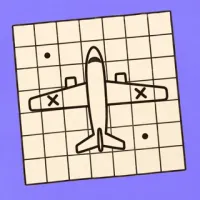
- Each plane covers 8 cells: the head at the front, a row of three for the wings and body, one more body cell, and a tail three cells wide. Planes may touch, but never share a cell.
- On your turn, tap a cell on the other side's board, then tap it again or tap Fire.
- Miss means an empty cell. Hit means part of a plane, but not its head. Headshot means the head, and the whole plane goes down.
- A headshot reveals only the head. The rest of the plane and its direction stay hidden.
- Tap Notes to plan on the enemy board: tap a cell to mark ?, tap the ? again to sketch a plane there, then tap the plane to rotate it or drag to move it. Only you can see your notes.
- Spread two fingers on the board to zoom in, and drag with one finger to look around.
- The first to hit every enemy head wins.
Play with a friend
- Open Recess and choose Plane Battle.
- Tap With a friend. Your table gets a code.
- Send your friend the code or the link. They join from a browser or the app.
Questions
Can two people play Plane Battle on two phones?
Yes. Open Recess, choose Plane Battle and tap With a friend. Then send your friend the code or the link.
Can I play Plane Battle against the computer?
Yes. Choose Plane Battle and play the robot on your own, at the level you pick.
Does my friend need to install anything?
No. Your friend can open the link in a browser and play with an internet connection. To play nearby without internet, you both need the app.




 Sudoku